Prerequisites
Before deploying the demo, verify the host meets the resource requirements below. Devbox or the VS Code Dev Container supplies the toolchain (task, kubectl, helm, k3d, k9s, argocd CLI); the host only needs a container runtime and git.
Host requirements
| Area | Minimum | Comfortable |
|---|---|---|
| CPU | 4 cores | 6+ cores |
| Memory | 8 GB | 12+ GB |
| Storage | 30 GB free | 40+ GB free |
| Virtualization | Enabled (VT-x/AMD-V) | — |
| Network | Internet access for image pulls | — |
Quick checks
git --versiondocker infoClone the repository
git clone https://github.com/rou-cru/idp-blueprintcd idp-blueprintLinux
Install Docker Engine (dockerd), start the service, and add your user to the docker
group (or use sudo). Verify virtualization is enabled in BIOS/UEFI and confirm with
docker info.
macOS
Install Docker Desktop. The default CPU/RAM limits are sufficient for the demo; increase them in Settings → Resources if memory utilization exceeds 80% or CPU throttling occurs. Virtualization is enabled by default (Intel or Apple Silicon).
Windows: Use WSL2
In an elevated PowerShell, enable WSL2 and install a distro:
wsl --installFor details, see Microsoft’s official WSL documentation.
Then open Docker Desktop and turn on “Use the WSL 2 based engine”
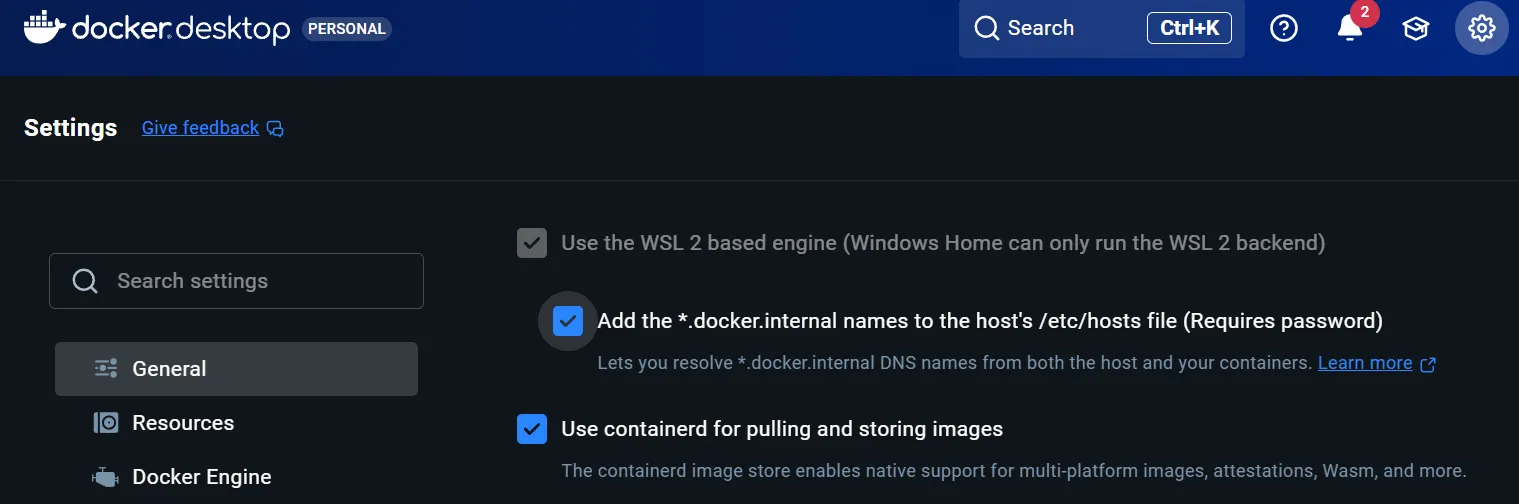
Use VS Code, open the folder and “Reopen in Container” to get the toolchain preloaded.
Ports and firewall
Default NodePorts are 30080 (HTTP) and 30443 (HTTPS); keep them free and allow inbound if you want LAN access. nip.io uses your LAN IP—make sure that IP is reachable from the browser device you will use.
Alternative: Devbox shell
:::tip In Windows this has to be done directly in WSL console :::
If you prefer to work outside VS Code (e.g., for a long-running home lab), install Devbox and run:
devbox shell